
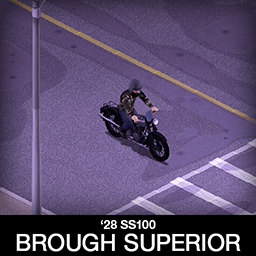
'28 Brough Superior SS100 — Zomboid Mod ID & 1-Click Install
Big and powerful! One of the most iconic classics of all time, Brough Superior SS100 looks fantastic even 100 years after it was designed! It has 2 variants with interchangeable parts. Main features: Detachable storage bags on the back Slot for tent storag
599,089 Subscribers
16,250 Favorites
3.0 MB
Updated 2023-02-07
Build 41 Vehicles Multiplayer Pop Culture
1-Click Server Setup: Workshop ID & Config Lines
Workshop ID
2913634132
servertest.ini Lines (Mod ID from the Workshop description)
WorkshopItems=2913634132
Mods=28ss100
SteamCMD Terminal Download (run in shell, not in config files)
steamcmd +login anonymous +workshop_download_item 108600 2913634132 +quit
How to Install '28 Brough Superior SS100 on a Dedicated Server
- Copy the Workshop ID
2913634132(or add multiple mods using the 1-Click Modlist Builder). - Paste
WorkshopItems=2913634132andMods=28ss100intoservertest.ini. On Build 42, prefix each Mod ID with a backslash (e.g.Mods=\28ss100). - Restart your Zomboid dedicated server and verify the mod loads in the server console.
Mod Metadata
| Game | Project Zomboid |
|---|---|
| Workshop ID | 2913634132 |
| Subscribers | 599,089 |
| Favorites | 16,250 |
| File Size | 3.0 MB |
| Last Updated | 2023-02-07 |