
[B41&B42] Show Wall Health — Zomboid Mod ID & 1-Click Install
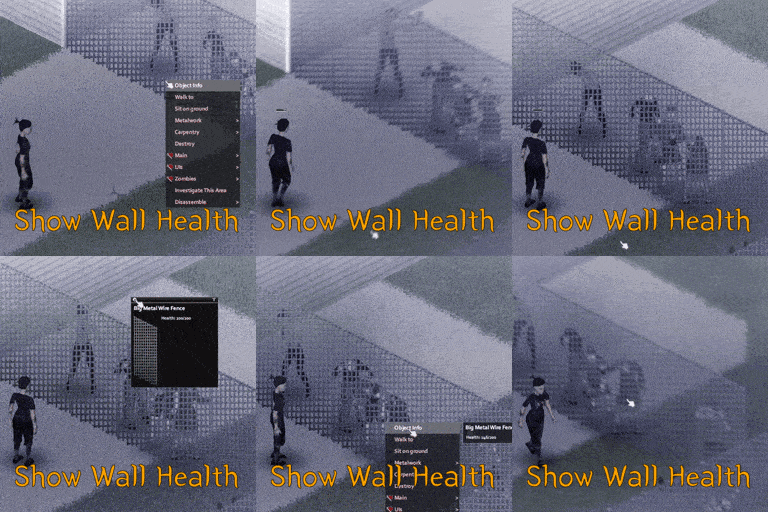
B42.22.2 version AVAILABLE! Have you ever wondered how long your gate/wall/anything lasts? Well, now you know and you can prepare for the next horde. Just right click on whatever you've built, then hover on the "Check Status" menu, and if you're closer you
307,077 Subscribers
9,571 Favorites
0.2 MB
Updated 2026-11-09
Build 41 Build 42 Interface Multiplayer QOL
1-Click Server Setup: Workshop ID & Config Lines
Workshop ID
3002666175
servertest.ini Lines (replace the placeholder with the Mod ID)
WorkshopItems=3002666175
Mods=<ModID from mod.info>
SteamCMD Terminal Download (run in shell, not in config files)
steamcmd +login anonymous +workshop_download_item 108600 3002666175 +quit
How to Install [B41&B42] Show Wall Health on a Dedicated Server
- Copy the Workshop ID
3002666175(or add multiple mods using the 1-Click Modlist Builder). - Paste
WorkshopItems=3002666175intoservertest.ini, then addMods=with the mod's ID. The author did not list it on the Workshop page — find theid=line in the mod'smod.info(insidesteamapps/workshop/content/108600/3002666175/mods/). On Build 42, prefix each Mod ID with a backslash (e.g.Mods=\ModID). - Restart your Zomboid dedicated server and verify the mod loads in the server console.
Mod Metadata
| Game | Project Zomboid |
|---|---|
| Workshop ID | 3002666175 |
| Subscribers | 307,077 |
| Favorites | 9,571 |
| File Size | 0.2 MB |
| Last Updated | 2026-11-09 |